
How to Navigate Your Advisor Compliance 13F Dashboard to Speed Up Filing
The article explains how financial advisors can use Orion Connect's Advisor Compliance 13F Dashboard—a tool that aggregates 13F securities using CUSIPs from the SEC list—to efficiently manage and expedite their Form 13F regulatory filings by providing key data insights within a single compliance suite.
🎟 Don't Miss Our Limited $849 Ascent Offer — Save $350 With Code ASCENT27EB. Register Now →
How to Navigate Your Advisor Compliance 13F Dashboard to Speed Up Filing
Advisor Tech
February 4, 2020
February 4, 2020 04:17 AM
Share: Facebook Twitter LinkedIn Email
As a financial advisor, getting ahead of your compliance obligations can be difficult to do among the many other tasks and directions you are pulled in throughout your day. But it doesn’t have to be if you have a robust compliance suite to help you.
Orion’s complete compliance suite — among our many other tools — enables you to tackle regulatory obligations quicker and easier. With Orion Connect, you can even capture all of your Form ADV and 13F regulatory reporting numbers in a single advisor compliance dashboard.
For this week’s Tech Tip, we go through how to navigate your advisor Compliance 13F Dashboard so that you’re ready when it’s time to file your 13F securities report.
Navigating the Advisor Compliance 13F Dashboard
The advisor Compliance 13F Dashboard in Orion Connect provides you with four important pieces of information.
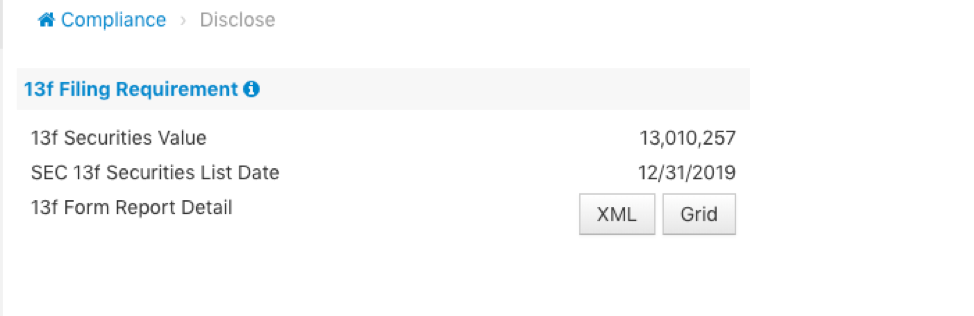
- 1.13f Securities Value: This is the aggregated total of every 13F security within your database. To identify 13f securities, Orion uses the CUSIP provided within the SECs 13F Securities list. Within Orion, we have installed 13f Reportable checkboxes at the Product (Products & Prices App), Account (Portfolio Audit App) and Asset levels (Portfolio Audit App).If the 13f Reportable checkbox is enabled at all levels and the securities CUSIP is on the SECs 13f list, that value is pulled onto the Compliance 13F Dashboard. As a default, 13f reportable is enabled for ALL products, accounts, and assets.
- 2.SEC 13f Securities List Date: This identifies the quarter in which the 13f Securities Value applies. Orion updates the list date to reflect the last day of the previous quarter. Quarter 1 will display 3/31, Quarter 2 will display 6/30, Quarter 3 will display 9/30, and Quarter 4 will display 12/31.
- 3.13f Form Report Detail Grid: Using the “Grid” option allows you to review on-screen the securities that are required for 13F filing. The SEC requires that you only file those securities that meet their minimum requirement of $200,000 and/or 10,000 shares.
- 4.13f Form Report Detail XML: Using the “XML” option provides the exact file format needed to upload 13F data into the SEC’s EDGAR system. The XML data is the same exact data as what is returned when using the “Grid” option.
Remember, the 13f Securities Value will not match the results returned by the Grid or XML options. This is because of the minimum requirements identified in Item 3.
For more tips on how to speed up your regulatory filing or to learn more about the advisor Compliance 13F Dashboard, contact our Subject Matter Expert Compliance Team at [email protected].
0233-OAS-2/4/2020
Copy link
✓
Thanks for sharing!
Find any service
A2A